When people ask, “what are the benefits of smart door locking systems,” they often expect a simple answer. Smart locks can provide keyless entry, remote access, activity records, and easier control for families or businesses. Instead of searching for keys beside a dark doorway, users may unlock a door with a code, fingerprint, phone, or approved access card. This small change can make daily routines more convenient.
However, convenience should not replace careful security decisions. A reliable smart lock should use strong encryption, secure authentication, and regular software updates. Reputable manufacturers also explain their data practices and provide clear recovery options. These details matter when a phone is lost, a battery becomes weak, or an internet connection fails. Some models continue working locally, while others depend heavily on cloud services. The difference is important.
In practical use, smart locking systems can help landlords manage temporary access, support older adults, and record entry times for authorized users. They may also connect with alarms, cameras, and home automation platforms. Still, no device is perfect. A poorly installed lock can create problems, and biometric readers may occasionally reject an authorized user. Batteries need attention. Emergency access must be planned.
This guide examines the main advantages, limitations, and practical considerations behind smart door locks. It focuses on real-world usability, responsible security, and informed purchasing decisions. The best system is not always the most expensive one. It is the system that fits the door, the users, and the surrounding security habits.
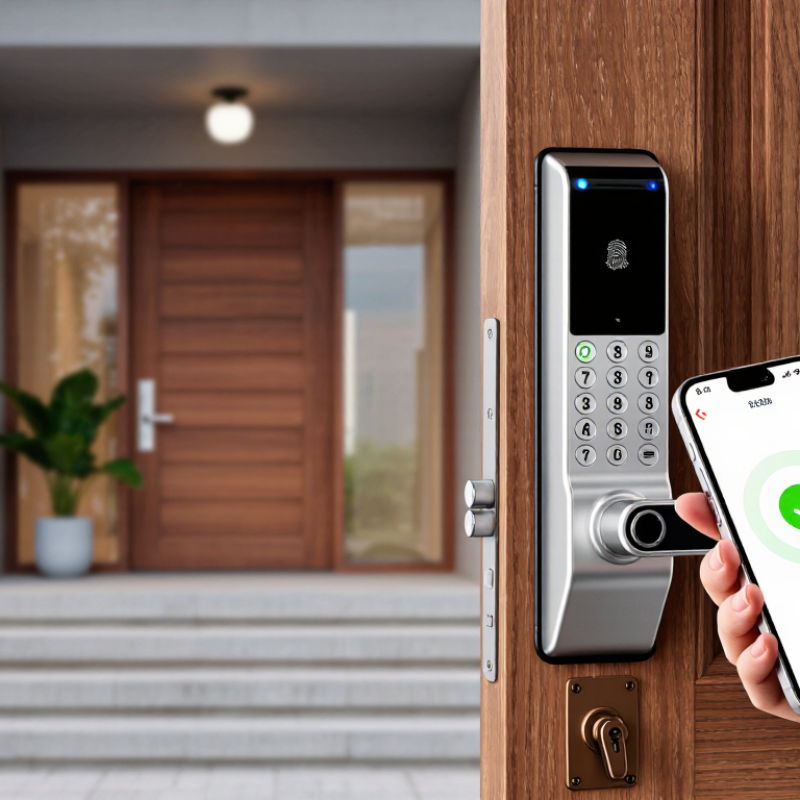
Smart door locking systems replace a traditional key with connected access control.
They usually combine an electronic deadbolt, motor, sensor, mobile application, and wireless connection. Some models accept PIN codes, fingerprints, temporary digital keys, or physical keys. The lock checks an authorized credential before moving the bolt. A sensor then confirms whether the door is closed and locked.
Remote access is a practical advantage. A homeowner can unlock the door for a contractor while standing at work. Activity logs can also show when a code was used. However, convenience depends on reliable power and connectivity. A drained battery can create an unpleasant problem.
Market perspective Grand View Research estimated the global smart lock market at approximately USD 2.4 billion in 2022, with strong growth expected through 2030. This expansion reflects rising interest in connected home security, not guaranteed protection.
The system still needs correct installation and careful account management.
Tips:
Choose a lock with low-battery warnings and a physical backup method. Use unique access codes for family members and visitors. Remove temporary codes after each visit. Check the door sensor beside the frame, not only through the app. Industry guidance from NIST encourages strong authentication and limited credential reuse. That advice matters because the weakest user habit may defeat sophisticated hardware. I would also test emergency access before trusting the lock overnight. Scratching the door during installation is possible, and small alignment errors can cause repeated motor failures.
Smart door locking systems strengthen everyday access control through authentication, alerts, and activity records. The FBI’s 2022 Crime in the United States report estimated 847,522 burglary offenses nationwide. A physical key cannot report who entered at 2:14 p.m. A connected lock can send that event to a phone, helping residents notice unusual access quickly. Temporary codes also reduce copied-key risks for cleaners, contractors, or guests. Better visibility matters.
Security depends on configuration, not appearance. Choose a lock with strong encryption, automatic updates, access logs, and multi-factor authentication. The Cybersecurity and Infrastructure Security Agency states that multifactor authentication can prevent more than 99% of automated account attacks. That protection helps secure the app controlling the lock.
Yet a smart lock is not a magic shield. A dead battery, weak router password, or forgotten user account can undermine good hardware. Keep a physical backup plan. Test it monthly. Small inconvenience, real resilience. The National Institute of Standards and Technology also recommends unique passwords, timely patching, and limited privileges. Those principles apply directly to household access. My practical concern is simple: many owners install the device, then ignore its settings. Review permissions after visitors leave, remove unused accounts, and enable entry notifications during overnight hours. Convenience improves security only when someone actively manages it.
Smart door locking systems make daily access simpler without removing human judgment. A resident can unlock a door with a PIN, temporary code, mobile credential, or approved fingerprint. Remote management adds another layer: an owner can issue access to a cleaner, check entry activity, and cancel permissions after a visit. According to Grand View Research, the global smart lock market was valued at about $2.2 billion in 2023 and is projected to grow strongly through 2030. That growth reflects practical demand, not just futuristic appeal.
Remote control is most valuable when routines change unexpectedly. A property manager can review a time-stamped event log from another location. A parent can confirm whether a child arrived home. A business can assign access windows instead of sharing physical keys. Parks Associates’ connected-home research has repeatedly identified security and convenience as major reasons households adopt smart-home devices. Still, remote access depends on stable connectivity, secure account settings, and careful permission management. Technology is helpful, but it is not magic.
Small details matter. Users should receive low-battery alerts before a lock becomes inconvenient. Backup entry methods should be tested during installation, not during an emergency. The European Union Agency for Cybersecurity emphasizes strong authentication, software updates, and secure device configuration for connected products. These recommendations are easy to overlook. Market forecasts also describe potential, not guaranteed performance. A smart lock can reduce key sharing, yet poor setup may create new risks. Human oversight remains necessary.
| Feature or Access Method | How It Works | Primary Benefit | Remote Management Capability | Important Consideration |
|---|---|---|---|---|
| PIN or Passcode Entry | Users enter a configurable code on a keypad instead of carrying a physical key. | Convenient keyless entry and easy sharing of authorized codes. | Administrators can often create, change, or delete codes through a connected application. | Use unique codes for different users and avoid easily guessed combinations. |
| Mobile App Access | A smartphone communicates with the lock through Bluetooth, Wi-Fi, or another supported connection. | Provides centralized control, status checking, and access history from a mobile device. | Supported when the lock has an active network connection or a compatible hub. | Remote functions depend on internet availability, app permissions, and device compatibility. |
| Temporary or Scheduled Access | Digital credentials are configured to work during defined dates or time periods. | Useful for guests, service providers, cleaners, and short-term occupants without issuing permanent keys. | Schedules can be created, edited, or revoked remotely on supported systems. | Time settings should be checked carefully, especially across daylight-saving changes or different time zones. |
| Remote Locking and Unlocking | An authorized administrator sends a command to the lock through its connected network. | Allows access to be granted or the door to be secured without being physically present. | Available on connected models with remote-control functionality. | Remote unlocking should be limited to trusted administrators and protected with strong account security. |
| Activity Logs | The system records events such as successful entries, failed attempts, and locking actions. | Improves visibility into who accessed the door and when. | Logs may be viewed, filtered, or exported through the management application, depending on the system. | Recorded information should be retained and shared in accordance with applicable privacy requirements. |
| Biometric Authentication | A supported lock verifies a registered fingerprint or other biometric characteristic. | Offers fast entry without requiring a key, card, or memorized code. | Some systems allow administrators to add or remove registered users remotely; others require local enrollment. | Performance may vary with dirt, moisture, injury, or changes to the enrolled biometric feature. |
| Low-Battery Notifications | Sensors monitor battery levels and generate an alert when replacement is needed. | Helps reduce the risk of unexpected lockouts caused by depleted batteries. | Connected systems can send notifications to authorized users through an app or email. | Keep the manufacturer-specified emergency power or mechanical backup method available. |
| Integration with Other Devices | The lock exchanges information with compatible alarms, sensors, voice assistants, or automation platforms. | Enables coordinated routines, such as securing doors when a security system is armed. | Rules and permissions can often be managed from a centralized smart-home platform. | Compatibility, data-sharing settings, and software support should be verified before installation. |
| Mechanical or Emergency Backup | A physical key, emergency power contact, or manual override provides an alternative entry method. | Maintains access if batteries, network services, or electronic components are unavailable. | Usually not controlled remotely because it is designed as a local fallback. | Backup keys and emergency procedures should be stored securely and tested periodically. |
Smart door locking systems become more valuable when they work with other home devices. A door sensor can trigger hallway lights when someone arrives at night. A security camera can record activity near the entrance. Motion sensors may also adjust alerts when residents are already inside. These connected routines reduce repeated tasks and provide clearer information during unusual events.
In practical installations, compatibility matters more than impressive features. The lock should communicate reliably with the home hub, alarm system, and mobile application. Access logs can show when a door opened and which authorized user entered. Temporary codes are useful for guests, cleaners, or maintenance workers. However, integration is not magic. A weak network, low battery, or incorrect setting can interrupt the entire routine. Local access methods, emergency power options, and regular software updates remain important. I have found that simpler automations are often more dependable than complicated ones.
Tips: Test every linked device before regular use. Create an alert for low battery or failed connection. Keep sensitive notifications limited to trusted household members. Review access permissions regularly. Do not connect every device automatically; unnecessary links may increase confusion and privacy risks. A monthly test can reveal problems before they matter.
Smart door locks can provide keyless entry, temporary access, and useful activity records. A phone, keypad, or biometric reader may reduce daily friction. However, convenience depends on power, connectivity, and correct installation. A dead battery can turn a modern entrance into a locked problem. Keep a mechanical backup where appropriate.
Cybersecurity deserves equal attention. Verizon’s 2024 Data Breach Investigations Report analyzed 30,458 security incidents and found human involvement in 68% of breaches. Weak passwords, reused credentials, and careless sharing can undermine a strong lock. NIST Special Publication 800-63B recommends rate limiting and stronger authentication controls. Choose systems supporting unique credentials, automatic updates, and local access during internet outages. Cloud features are useful, but they create additional privacy and service-dependency concerns.
Physical compatibility is easy to underestimate. Measure the door thickness, backset, frame alignment, and available clearance before buying. Some older doors need professional adjustments. Installation should not weaken fire exits or conflict with local building requirements. Check battery alerts monthly, test emergency access, and remove former users promptly. Activity logs can improve accountability, yet they also record household routines. That trade-off deserves an honest conversation.
Smart does not mean fail-proof. The best decision may be a simpler lock with better maintenance.
(Sources: Verizon 2024 Data Breach Investigations Report; NIST SP 800-63B)
It records access events and can send alerts to your phone. You may see who entered at 2:14 p.m. Better visibility helps.
No device is flawless. Security depends on encryption, updates, strong passwords, and careful settings. A weak router password can undermine good hardware.
Yes. You can create a code for a cleaner, contractor, or guest. Delete it after the visit. That step is easy to forget.
Common options include PINs, temporary codes, mobile credentials, and approved fingerprints. Use the method that fits your household. Convenience still needs judgment.
Remote management can let you approve access, review activity, or cancel permissions. It depends on stable connectivity and secure account settings. Remote control is not magic.
Enable low-battery alerts and replace batteries promptly. Test backup entry methods during installation. Do not wait for an emergency.
Remove unused accounts and review permissions after visitors leave. Limit each person’s access to necessary times. Small checks prevent lingering access.
Test it monthly, including the physical backup method. Check it before travel or busy periods. I would not trust memory alone.
Smart door locking systems replace traditional keys with electronic access methods such as PIN codes, mobile apps, biometric identification, or temporary digital credentials. Their main purpose is to improve entry security while making access easier to manage. When asking “what are the benefits of smart door locking systems,” the key advantages include better control over who can enter, activity records, automatic locking, and the ability to change or cancel permissions without replacing physical locks. Many systems also allow remote monitoring and operation, helping homeowners or property managers respond quickly when access needs change.
These locks can connect with smart home platforms, cameras, alarms, lighting, and other security devices to create coordinated routines and alerts. However, installation should be considered carefully. Users should evaluate battery life, internet or network dependence, emergency entry options, privacy protection, device compatibility, and the strength of the physical lock itself. Smart features can improve convenience and oversight, but they work best when supported by secure settings, regular updates, and a reliable backup access method.

MX Lock